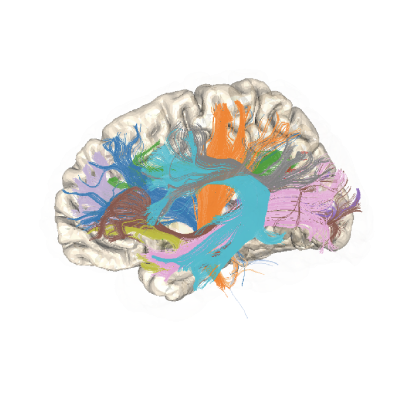
BabyAFQ : tractometry for infant dMRI data#
The following is an example of tractometry for infant bundles. This example and resulting pyAFQ support for pediatric bundles was inspired by and largely due to the work of Grotheer et al. [Grotheer2021], as implemented in [Grotheer2023].
Note
Because it is time and disk-space consuming, this example is not run when the pyAFQ documentation is built. To run this example yourself, you can download the contents of this file as an executable `.py` file or as a Jupyter notebook from the links at the bottom of the page.
import os.path as op
import plotly
import wget
import zipfile

from AFQ.api.group import GroupAFQ
import AFQ.api.bundle_dict as abd
import AFQ.data.fetch as afd
2026-05-26 22:53:55,658 INFO util.py:154 -- Missing packages: ['ipywidgets']. Run `pip install -U ipywidgets`, then restart the notebook server for rich notebook output.
Baby dMRI data#
Infant MRI data are quite different from data acquired in grownup participants, and even from children that are just a few years older. First, there is the rather obvious difference in size. Baby brains are approximately 25% the size of grownup brains at birth. But there are also often less known differences in brain tissue properties. For example, the myelin content of white matter is much lower in infants than in grownups. This is important because the diffusion signal that we measure with dMRI is sensitive to the myelin content, and it means that the dMRI signal differs quite a bit in newborn infants. For the purpose of delineating the major white matter pathways, it is also important to know that their shape, location and curvature is different in infants than in grownups. For example, the arcuate fasciculus is much more curved in infants than in grownups. Because of this, we use a different set of templates for infant brains than for grownup brains. These templates were created and validated by Mareike Grotheer and colleagues in [Grotheer2021]_. They are available for download as part of the pyAFQ software, as we will show below.
In this example, we will demonstrate the use of pyAFQ on data from one
infant. The data, provided by Kalanit Grill Spector’s
Stanford Vision and Perception Neuroscience Lab <http://vpnl.stanford.edu/>,
and was previously published in [Grotheer2021]_.
The data is available to download on
Figshare <https://figshare.com/articles/dataset/Example_babyAFQ_BIDS_subject/21440739>.
You can download it from there and unzip it into ~/AFQ_Data/baby_example/
(Note that this is 2.69GB of data, so it can take a while to download). Or
you can download it and unzip it using the following block of code.
data_folder = op.join(op.expanduser('~'), "AFQ_data/")
baby_zip = op.join(data_folder, "baby_example.zip")
if not op.exists(baby_zip):
    print("Downloading processed pediatric data; this could take a while...")
    wget.download(
        "https://figshare.com/ndownloader/files/38053692",
        baby_zip)

with zipfile.ZipFile(baby_zip, 'r') as zip_ref:
    zip_ref.extractall(op.join(data_folder, "baby_example"))
Downloading processed pediatric data; this could take a while...
---------------------------------------------------------------------------
KeyboardInterrupt                         Traceback (most recent call last)
Cell In[2], line 5
      1 data_folder = op.join(op.expanduser('~'), "AFQ_data/")
      2 baby_zip = op.join(data_folder, "baby_example.zip")
      3 if not op.exists(baby_zip):
      4     print("Downloading processed pediatric data; this could take a while...")
----> 5     wget.download(
      6         "https://figshare.com/ndownloader/files/38053692",
      7         baby_zip)
      8

File /opt/hostedtoolcache/Python/3.13.13/x64/lib/python3.13/site-packages/wget.py:526, in download(url, out, bar)
    524 else:
    525     binurl = url
--> 526 (tmpfile, headers) = ulib.urlretrieve(binurl, tmpfile, callback)
    527 filename = detect_filename(url, out, headers)
    528 if outdir:

File /opt/hostedtoolcache/Python/3.13.13/x64/lib/python3.13/urllib/request.py:242, in urlretrieve(url, filename, reporthook, data)
    239 if reporthook:
    240     reporthook(blocknum, bs, size)
--> 242 while block := fp.read(bs):
    243     read += len(block)
    244     tfp.write(block)

File /opt/hostedtoolcache/Python/3.13.13/x64/lib/python3.13/http/client.py:484, in HTTPResponse.read(self, amt)
    481 if self.length is not None and amt > self.length:
    482     # clip the read to the "end of response"
    483     amt = self.length
--> 484 s = self.fp.read(amt)
    485 if not s and amt:
    486     # Ideally, we would raise IncompleteRead if the content-length
    487     # wasn't satisfied, but it might break compatibility.
    488     self._close_conn()

File /opt/hostedtoolcache/Python/3.13.13/x64/lib/python3.13/socket.py:719, in SocketIO.readinto(self, b)
    717     raise OSError("cannot read from timed out object")
    718 try:
--> 719     return self._sock.recv_into(b)
    720 except timeout:
    721     self._timeout_occurred = True

File /opt/hostedtoolcache/Python/3.13.13/x64/lib/python3.13/ssl.py:1304, in SSLSocket.recv_into(self, buffer, nbytes, flags)
   1300     if flags != 0:
   1301         raise ValueError(
   1302           "non-zero flags not allowed in calls to recv_into() on %s" %
   1303           self.__class__)
-> 1304     return self.read(nbytes, buffer)
   1305 else:
   1306     return super().recv_into(buffer, nbytes, flags)

File /opt/hostedtoolcache/Python/3.13.13/x64/lib/python3.13/ssl.py:1138, in SSLSocket.read(self, len, buffer)
   1136 try:
   1137     if buffer is not None:
-> 1138         return self._sslobj.read(len, buffer)
   1139     else:
   1140         return self._sslobj.read(len)

KeyboardInterrupt:
Initialize a GroupAFQ object:#
Now that the data is downloaded and organized in a BIDS-compliant structure, we can start running pyAFQ on it. We start by initializing a GroupAFQ object. This object manages all of the data transformations and computations conducted by the software, based on its initial configuration, which we set up below.
A few special things to note here:
The data were preprocessed using the
vistasoftpipeline, so we setdwi_preproc_pipeline = "vistasoft".We use the UNC neonatal template, which can be read on a call to the
read_pediatric_templatesfunction inAFQ.data.fetch.We use the
baby_bdto define the bundles that we want to segment. This dictionary is different from the default behavior in that it uses the waypoint ROIs from [Grotheer2021]_.In this case, tractography has already been run using
MRTRIX <https://www.mrtrix.org/>, and is accessed using theimport_tractkey-word argument.
myafq = GroupAFQ(
    bids_path=op.join(op.expanduser('~'),
                      "AFQ_data/baby_example/example_bids_subject"),
    dwi_preproc_pipeline="vistasoft",
    reg_template_spec=afd.read_pediatric_templates(
    )["UNCNeo-withCerebellum-for-babyAFQ"],
    reg_subject_spec="b0",
    bundle_info=abd.baby_bd(),
    import_tract={
        "suffix": "tractography", "scope": "mrtrix"},
)
Running the pipeline#
A call to the export function will trigger the pyAFQ pipeline. This will
run tractography, bundle segmentation, and bundle cleaning. The results will
be saved in the ~/AFQ_data/baby_example/derivatives/afq folder. This can
take a while to run, depending on your computer.
In this case, we call export with the all_bundles_figure option. This is
because visualizations are created after most other parts of the pipeline
have been run. This means that when this call is done, you should have many
of the derivative results in the output folder, including the tractography,
segmentation, and tract profile results, as well as the visualizations.
viz = myafq.export("all_bundles_figure")
Viewing the results#
One way to view the results is to open the file named
sub-01_ses-01_dwi_space-RASMM_model-probCSD_algo-AFQ_desc-viz_dwi.html
in your browser. This is a visualization of the tractography and segmentation
results for all of the bundles. You can navigate this visualization by
clicking on the different bundles in the legend on the right side of the
screen. You can also zoom in and out using the mouse wheel, and rotate the
view by clicking and dragging with the mouse. You can also view the FA tract
profiles in a plot on the left side of the page.
If the baby bundles appear dark in the html visualization due to low FA values, you
can reduce the upper limit of the range in the sbv_lims_bundles option when
building your GroupAFQ object (e.g. GroupAFQ(..., sbv_lims_bundles=[0, 0.5])).
References:#
.. [Grotheer2021] Grotheer, Mareike, Mona Rosenke, Hua Wu, Holly Kular, Francesca R. Querdasi, Vaidehi S. Natu, Jason D. Yeatman, and Kalanit Grill-Spector. “White matter myelination during early infancy is linked to spatial gradients and myelin content at birth.” Nature communications 13: 997.
.. [Grotheer2023] Grotheer, Mareike, David Bloom, John Kruper, Adam Richie-Halford, Stephanie Zika, Vicente A. Aguilera González, Jason D. Yeatman, Kalanit Grill-Spector, and Ariel Rokem. “Human white matter myelinates faster in utero than ex utero.” Proceedings of the National Academy of Sciences 120: e2303491120.