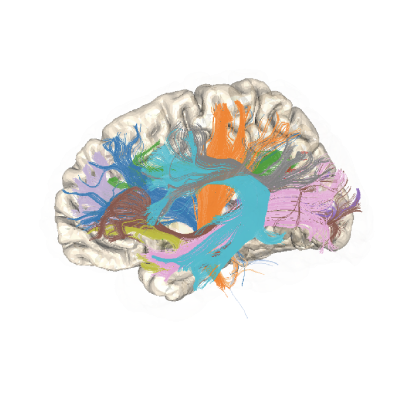
Understanding the different stages of tractometry with videos#
Two-dimensional figures of anatomical data are somewhat limited, because of the complex three-dimensional configuration of the brain. Therefored, dynamic videos of anatomical data are useful for exploring the data, as well as for creating dynamic presentations of the results. This example visualizes various stages of tractometry, from preprocessed diffusion data to the final tract profiles. We will use the Fury software library to visualize individual frames of the results of each stage, and then create videos of each stage of the process using the Python Image Library (PIL, also known as pillow).
Imports#
import os.path as op
import nibabel as nib
import numpy as np
from math import radians

from dipy.io.streamline import load_trk
from dipy.tracking.streamline import (transform_streamlines,
                                      set_number_of_points,
                                      values_from_volume)
from dipy.core.gradients import gradient_table
from dipy.align import resample
from dipy.stats.analysis import afq_profile

from fury import actor, window
from fury.colormap import create_colormap
from matplotlib.cm import tab20

import AFQ.data.fetch as afd
from AFQ.viz.utils import gen_color_dict
from AFQ._fixes import make_gif
rendercanvas could not load some backends:
jupyter: No module named 'jupyter_rfb'
Rendercanvas selected glfw backend because asyncio loop is running.
2026-05-26 22:56:19,639 INFO util.py:154 -- Missing packages: ['ipywidgets']. Run `pip install -U ipywidgets`, then restart the notebook server for rich notebook output.
Get data from HBN POD2#
We get the same data that is used in the visualization tutorials.
afd.fetch_hbn_preproc(["NDARAA948VFH"])
study_path = afd.fetch_hbn_afq(["NDARAA948VFH"])[1]
Visualize the processed dMRI data#
The HBN POD2 dataset was processed using the qsiprep pipeline. The
results from this processing are stored within a sub-folder of the
derivatives folder within the study folder.
Here, we will start by visualizing the diffusion data. We read in the
diffusion data, as well as the gradient table, using the nibabel library.
We then extract the b0, b1000, and b2000 volumes from the diffusion data.
We will use the actor.data_slicer function from fury to visualize these. This
function takes a 3D volume as input and returns a slicer actor, which can
then be added to a window.Scene object. We create a helper function that
will create a slicer actor for a given volume and a given slice along the x,
y, or z dimension. We then call this function three times, once for each of
the b0, b1000, and b2000 volumes, and add the resulting slicer actors to a
scene. We set the camera on the scene to a view that we like, and then we
record the scene into png files and subsequently gif animations. We do this
for each of the three volumes.
deriv_path = op.join(
    study_path, "derivatives")

qsiprep_path = op.join(
    deriv_path,
    'qsiprep',
    'sub-NDARAA948VFH',
    'ses-HBNsiteRU')

dmri_img = nib.load(op.join(
    qsiprep_path,
    'dwi',
    'sub-NDARAA948VFH_ses-HBNsiteRU_acq-64dir_space-T1w_desc-preproc_dwi.nii.gz'))

gtab = gradient_table(
    bvecs=op.join(qsiprep_path, "dwi",
                  "sub-NDARAA948VFH_ses-HBNsiteRU_acq-64dir_space-T1w_desc-preproc_dwi.bvec"),
    bvals=op.join(qsiprep_path, "dwi",
                  "sub-NDARAA948VFH_ses-HBNsiteRU_acq-64dir_space-T1w_desc-preproc_dwi.bval"))

dmri_data = dmri_img.get_fdata()

dmri_b0 = dmri_data[..., 0]
dmri_b1000 = dmri_data[..., 1]
dmri_b2000 = dmri_data[..., 65]


def slice_volume(data, x=None, y=None, z=None):
    if x is None:
        x = data.shape[0] // 2
    if y is None:
        y = data.shape[1] // 2
    if z is None:
        z = data.shape[2] // 2
    slicer_actor = actor.data_slicer(
        data,
        initial_slices=(x, y, z))
    return slicer_actor


slicer_b0 = slice_volume(
    dmri_b0,
    z=dmri_b0.shape[-1] // 3)
slicer_b1000 = slice_volume(
    dmri_b1000,
    z=dmri_b1000.shape[-1] // 3)
slicer_b2000 = slice_volume(
    dmri_b2000,
    z=dmri_b2000.shape[-1] // 3)

for bval, slicer in zip([0, 1000, 2000],
                         [slicer_b0, slicer_b1000, slicer_b2000]):
    scene = window.Scene()
    scene.add(slicer)
    scene.background = (1, 1, 1)

    show_m = window.ShowManager(
        scene=scene, window_type="offscreen",
        size=(2400, 2400)
    )
    window.update_camera(show_m.screens[0].camera, None, slicer)
    show_m.screens[0].controller.rotate((0, radians(-90)), None)
    make_gif(show_m, f'b{bval}.gif')
Unable to find extension: VK_EXT_physical_device_drm
No windowing system present. Using surfaceless platform
No config found!
No config found!
Generating GIF: 0%| | 0/36 [00:00<?, ?it/s]
Generating GIF: 3%|▎ | 1/36 [00:01<00:47, 1.35s/it]
Generating GIF: 6%|▌ | 2/36 [00:02<00:45, 1.35s/it]
Generating GIF: 8%|▊ | 3/36 [00:04<00:45, 1.39s/it]
Generating GIF: 11%|█ | 4/36 [00:05<00:43, 1.37s/it]
Generating GIF: 14%|█▍ | 5/36 [00:06<00:42, 1.36s/it]
Generating GIF: 17%|█▋ | 6/36 [00:08<00:40, 1.36s/it]
Generating GIF: 19%|█▉ | 7/36 [00:09<00:39, 1.36s/it]
Generating GIF: 22%|██▏ | 8/36 [00:10<00:38, 1.37s/it]
Generating GIF: 25%|██▌ | 9/36 [00:12<00:36, 1.36s/it]
Generating GIF: 28%|██▊ | 10/36 [00:13<00:35, 1.37s/it]
Generating GIF: 31%|███ | 11/36 [00:15<00:34, 1.37s/it]
Generating GIF: 33%|███▎ | 12/36 [00:16<00:32, 1.37s/it]
Generating GIF: 36%|███▌ | 13/36 [00:17<00:31, 1.37s/it]
Generating GIF: 39%|███▉ | 14/36 [00:19<00:29, 1.36s/it]
Generating GIF: 42%|████▏ | 15/36 [00:20<00:28, 1.36s/it]
Generating GIF: 44%|████▍ | 16/36 [00:21<00:27, 1.36s/it]
Generating GIF: 47%|████▋ | 17/36 [00:23<00:25, 1.36s/it]
---------------------------------------------------------------------------
KeyboardInterrupt                         Traceback (most recent call last)
Cell In[3], line 63
     59         size=(2400, 2400)
     60     )
     61     window.update_camera(show_m.screens[0].camera, None, slicer)
     62     show_m.screens[0].controller.rotate((0, radians(-90)), None)
---> 63     make_gif(show_m, f'b{bval}.gif')

File /opt/hostedtoolcache/Python/3.13.13/x64/lib/python3.13/site-packages/AFQ/_fixes.py:399, in make_gif(show_m, out_path, n_frames, az_ang, duration)
    397 show_m.screens[0].controller.rotate((radians(az_ang), 0), None)
    398 show_m.render()
--> 399 show_m.window.draw()
    400 show_m.snapshot(frame_fname)
    401 video.append(Image.open(frame_fname).convert("RGB"))

File /opt/hostedtoolcache/Python/3.13.13/x64/lib/python3.13/site-packages/rendercanvas/offscreen.py:126, in OffscreenRenderCanvas.draw(self)
    121 def draw(self):
    122     """Perform a draw and get the resulting image.
    123
    124     The image is returned as a contiguous NxMx4 numpy array.
    125     """
--> 126     self.force_draw()
    127     return self._last_image

File /opt/hostedtoolcache/Python/3.13.13/x64/lib/python3.13/site-packages/rendercanvas/base.py:501, in BaseRenderCanvas.force_draw(self)
    499     self._rc_force_paint()  # -> _time_to_paint() -> _draw_and_present()
    500 else:
--> 501     self._draw_and_present(force_sync=True)
    502     self._rc_force_paint()

File /opt/hostedtoolcache/Python/3.13.13/x64/lib/python3.13/site-packages/rendercanvas/base.py:596, in BaseRenderCanvas._draw_and_present(self, force_sync)
    592 with log_exception("Present init error"):
    593     # Note: if vsync is used, this call may wait a little (happens down at the level of the driver or OS)
    595     if force_sync:
--> 596         result = context._rc_present(force_sync=True)
    597         assert result["method"] != "async"
    598         self._finish_present(result)

File /opt/hostedtoolcache/Python/3.13.13/x64/lib/python3.13/site-packages/rendercanvas/contexts/wgpucontext.py:328, in WgpuContextToBitmap._rc_present(self, force_sync)
    326     return {"method": "skip"}
    327 if force_sync:
--> 328     return self._downloader.do_sync_download(
    329         self._texture, self._present_params
    330     )
    331 else:
    332     awaitable = self._downloader.initiate_download(
    333         self._texture, self._present_params
    334     )

File /opt/hostedtoolcache/Python/3.13.13/x64/lib/python3.13/site-packages/rendercanvas/contexts/wgpucontext.py:401, in ImageDownloader.do_sync_download(self, texture, present_params)
    399 def do_sync_download(self, texture, present_params):
    400     # Start a fresh download
--> 401     self._get_awaitable_for_download(texture)
    403     # With a fresh action
    404     self._action.cancel()

File /opt/hostedtoolcache/Python/3.13.13/x64/lib/python3.13/site-packages/rendercanvas/contexts/wgpucontext.py:385, in ImageDownloader._get_awaitable_for_download(self, texture, present_params)
    382 action.set_buffer(self._buffer)
    384 # Initiate copying the texture to the buffer
--> 385 self._queue_command_to_copy_texture(texture, stride)
    387 # Note: the buffer.map_async() method by default also does a flush, to hide a bug in wgpu-core (https://github.com/gfx-rs/wgpu/issues/5173).
    388 # That bug does not affect this use-case, so we use a special (undocumented :/) map-mode to prevent wgpu-py from doing its sync thing.
    389 awaitable = self._buffer.map_async("READ_NOSYNC", 0, nbytes)

File /opt/hostedtoolcache/Python/3.13.13/x64/lib/python3.13/site-packages/rendercanvas/contexts/wgpucontext.py:454, in ImageDownloader._queue_command_to_copy_texture(self, texture, stride)
    452 encoder.copy_texture_to_buffer(source, destination, texture.size)
    453 command_buffer = encoder.finish()
--> 454 self._device.queue.submit([command_buffer])

File /opt/hostedtoolcache/Python/3.13.13/x64/lib/python3.13/site-packages/wgpu/backends/wgpu_native/_api.py:3891, in GPUQueue.submit(self, command_buffers)
   3889 c_command_buffers = new_array("WGPUCommandBuffer[]", command_buffer_ids)
   3890 # H: void f(WGPUQueue queue, size_t commandCount, WGPUCommandBuffer const * commands)
-> 3891 libf.wgpuQueueSubmit(self._internal, len(command_buffer_ids), c_command_buffers)

File /opt/hostedtoolcache/Python/3.13.13/x64/lib/python3.13/site-packages/wgpu/backends/wgpu_native/_helpers.py:356, in SafeLibCalls._make_proxy_func.<locals>.proxy_func(*args)
    354 error_handler.capture(name)
    355 try:
--> 356     result = ob(*args)
    357 finally:
    358     error_type_msg = error_handler.release(name)

KeyboardInterrupt:
Visualizing whole-brain tractography#
One of the first steps of the pyAFQ pipeline is to generate whole-brain tractography. We will visualize the results of this step. We start by reading in the FA image, which is used as a reference for the tractography. We then load the whole brain tractography, and transform the coordinates of the streamlines into the coordinate frame of the T1-weighted data.
If you are interested in learning more about the different steps of the tractometry pipeline, you can reference DIPY examples. Here are some relevant links:
For an example of fitting FA, see: https://docs.dipy.org/1.11.0/examples_built/reconstruction/reconst_dti.html For an example of running tractography, see: https://docs.dipy.org/1.11.0/examples_built/fiber_tracking/tracking_probabilistic.html
afq_path = op.join(
    deriv_path,
    'afq',
    'sub-NDARAA948VFH',
    'ses-HBNsiteRU')

fa_img = nib.load(op.join(afq_path,
                          'sub-NDARAA948VFH_ses-HBNsiteRU_acq-64dir_space-T1w_desc-preproc_dwi_model-DKI_FA.nii.gz'))


sft_whole_brain = load_trk(op.join(afq_path,
                                   'sub-NDARAA948VFH_ses-HBNsiteRU_acq-64dir_space-T1w_desc-preproc_dwi_space-RASMM_model-CSD_desc-prob-afq_tractography.trk'), fa_img)


t1w_img = nib.load(op.join(deriv_path,
                           'qsiprep/sub-NDARAA948VFH/anat/sub-NDARAA948VFH_desc-preproc_T1w.nii.gz'))
t1w = t1w_img.get_fdata()
sft_whole_brain.to_rasmm()
whole_brain_t1w = transform_streamlines(
    sft_whole_brain.streamlines,
    np.linalg.inv(t1w_img.affine))
Visualize the streamlines#
The streamlines are visualized in the context of the T1-weighted data.
whole_brain_actor = actor.streamlines(whole_brain_t1w, thickness=2)
slicer = slice_volume(t1w, y=t1w.shape[1] // 2 - 5, z=t1w.shape[-1] // 3)

def rotate_to_anterior(show_m):
    window.update_camera(show_m.screens[0].camera, None, slicer)
    show_m.screens[0].controller.rotate((0, radians(-90)), None)


scene = window.Scene()

scene.add(whole_brain_actor)
scene.add(slicer)

scene.background = (1, 1, 1)
show_m = window.ShowManager(
    scene=scene, window_type="offscreen",
    size=(2400, 2400)
)
rotate_to_anterior(show_m)
make_gif(show_m, "whole_brain.gif")
Whole brain with waypoints#
We can also generate a gif video with the whole brain tractography and the waypoints that are used to define the bundles. We will use the same scene as before, but we will add the waypoints as contours to the scene.
To get these waypoints in subject space, we had to register to MNI. Once again, there is a helpful DIPY example for details: https://docs.dipy.org/1.11.0/examples_built/registration/syn_registration_3d.html
scene.clear()
whole_brain_actor = actor.streamlines(whole_brain_t1w, thickness=2)

scene.add(whole_brain_actor)
scene.add(slicer)

scene.background = (1, 1, 1)

waypoint1 = nib.load(
    op.join(
        afq_path,
        "ROIs", "sub-NDARAA948VFH_ses-HBNsiteRU_acq-64dir_space-T1w_desc-preproc_dwi_desc-ROI-ARC_L-1-include.nii.gz"))

waypoint2 = nib.load(
    op.join(
        afq_path,
        "ROIs", "sub-NDARAA948VFH_ses-HBNsiteRU_acq-64dir_space-T1w_desc-preproc_dwi_desc-ROI-ARC_L-2-include.nii.gz"))

waypoint1_xform = resample(waypoint1, t1w_img)
waypoint2_xform = resample(waypoint2, t1w_img)
waypoint1_data = waypoint1_xform.get_fdata() > 0
waypoint2_data = waypoint2_xform.get_fdata() > 0

surface_color = tab20.colors[0]

waypoint1_actor = actor.contour_from_roi(waypoint1_data,
                                         color=surface_color,
                                         opacity=0.5)

waypoint2_actor = actor.contour_from_roi(waypoint2_data,
                                         color=surface_color,
                                         opacity=0.5)

scene.add(waypoint1_actor)
scene.add(waypoint2_actor)

show_m = window.ShowManager(
    scene=scene, window_type="offscreen",
    size=(2400, 2400)
)
rotate_to_anterior(show_m)
make_gif(show_m, "whole_brain_with_waypoints.gif")

bundle_path = op.join(afq_path,
                      'bundles')
Define the bundles
The bundles are defined by the waypoints that we just visualized. Here
we organize some names of bundles we want to visualize.
In current pyAFQ, only the formal names are used. But for this example,
we will use derivatives from previous versions of pyAFQ, where names
were abbreviated. We have standardized colors for each bundle,
provided by gen_color_dict, which we will use for visualization.
bundles = [
    "ARC_R",
    "ATR_R",
    "CST_R",
    "IFO_R",
    "ILF_R",
    "SLF_R",
    "UNC_R",
    "CGC_R",
    "Orbital", "AntFrontal", "SupFrontal", "Motor",
    "SupParietal", "PostParietal", "Temporal", "Occipital",
    "CGC_L",
    "UNC_L",
    "SLF_L",
    "ILF_L",
    "IFO_L",
    "CST_L",
    "ATR_L",
    "ARC_L",
]

formal_bundles = [
    "Right Arcuate",
    "Right Anterior Thalamic",
    "Right Corticospinal",
    "Right Inferior Fronto-Occipital",
    "Right Inferior Longitudinal",
    "Right Superior Longitudinal",
    "Right Uncinate",
    "Right Cingulum Cingulate",
    "Callosum Orbital",
    "Callosum Anterior Frontal",
    "Callosum Superior Frontal",
    "Callosum Motor",
    "Callosum Superior Parietal",
    "Callosum Posterior Parietal",
    "Callosum Temporal",
    "Callosum Occipital",
    "Left Cingulum Cingulate",
    "Left Uncinate",
    "Left Superior Longitudinal",
    "Left Inferior Longitudinal",
    "Left Inferior Fronto-Occipital",
    "Left Corticospinal",
    "Left Anterior Thalamic",
    "Left Arcuate",
]

color_dict = gen_color_dict(formal_bundles)
Visualize the arcuate bundle#
Now visualize only the arcuate bundle that is selected with these waypoints.
fa_img = nib.load(op.join(afq_path,
                          'sub-NDARAA948VFH_ses-HBNsiteRU_acq-64dir_space-T1w_desc-preproc_dwi_model-DKI_FA.nii.gz'))
fa = fa_img.get_fdata()
sft_arc = load_trk(op.join(bundle_path,
                           'sub-NDARAA948VFH_ses-HBNsiteRU_acq-64dir_space-T1w_desc-preproc_dwi_space-RASMM_model-CSD_desc-prob-afq-ARC_L_tractography.trk'), fa_img)

sft_arc.to_rasmm()
arc_t1w = transform_streamlines(sft_arc.streamlines,
                                np.linalg.inv(t1w_img.affine))

arc_actor = actor.streamlines(arc_t1w, thickness=8, colors=color_dict['Left Arcuate'])
scene.clear()

scene.add(arc_actor)
scene.add(slicer)

scene.add(waypoint1_actor)
scene.add(waypoint2_actor)

show_m = window.ShowManager(
    scene=scene, window_type="offscreen",
    size=(2400, 2400)
)
rotate_to_anterior(show_m)
make_gif(show_m, "arc1.gif")
Clean bundle#
The next step in processing would be to clean the bundle by removing streamlines that are outliers. We will visualize the cleaned bundle.
scene.clear()

scene.add(arc_actor)
scene.add(slicer)

show_m = window.ShowManager(
    scene=scene, window_type="offscreen",
    size=(2400, 2400)
)
rotate_to_anterior(show_m)
make_gif(show_m, "arc2.gif")

clean_bundles_path = op.join(afq_path,
                             'clean_bundles')

sft_arc = load_trk(op.join(clean_bundles_path,
                           'sub-NDARAA948VFH_ses-HBNsiteRU_acq-64dir_space-T1w_desc-preproc_dwi_space-RASMM_model-CSD_desc-prob-afq-ARC_L_tractography.trk'), fa_img)

sft_arc.to_rasmm()
arc_t1w = transform_streamlines(sft_arc.streamlines,
                                np.linalg.inv(t1w_img.affine))

arc_actor = actor.streamlines(arc_t1w, thickness=8, colors=tab20.colors[18])
scene.clear()

scene.add(arc_actor)
scene.add(slicer)

show_m = window.ShowManager(
    scene=scene, window_type="offscreen",
    size=(2400, 2400)
)
rotate_to_anterior(show_m)
make_gif(show_m, "arc3.gif")
Show the values of tissue properties along the bundle#
We can also visualize the values of tissue properties along the bundle. Here
we will visualize the fractional anisotropy (FA) along the arcuate bundle.
This is done by using a colormap to color the streamlines according to the
values of the tissue property, with fury.colormap.create_colormap.
There is a DIPY example with more details here: https://docs.dipy.org/1.11.0/examples_built/streamline_analysis/afq_tract_profiles.html
scene.clear()

fa_in_t1 = resample(fa_img, t1w_img).get_fdata()
fa_profiles = values_from_volume(fa_in_t1, arc_t1w, np.eye(4))
for ii in range(len(arc_t1w)):
    colors = create_colormap(np.asarray(fa_profiles[ii]), name="blues", auto=False)
    arc_actor = actor.streamlines(
        arc_t1w[ii], thickness=8,
        colors=colors)
    scene.add(arc_actor)

scene.add(slicer)

show_m = window.ShowManager(
    scene=scene, window_type="offscreen",
    size=(2400, 2400)
)
rotate_to_anterior(show_m)
make_gif(show_m, "arc4.gif")
Core of the bundle and tract profile#
Finally, we can visualize the core of the bundle and the tract profile. The core of the bundle is the median of the streamlines, and the tract profile is the values of the tissue property along the core of the bundle.
core_arc = np.median(np.asarray(set_number_of_points(arc_t1w, 20)), axis=0)

sft_arc.to_vox()
arc_profile = afq_profile(fa, sft_arc.streamlines, affine=np.eye(4),
                          n_points=20)

core_arc_actor = actor.streamlines(
    [core_arc],
    thickness=40,
    colors=create_colormap(arc_profile, name='viridis')
)

arc_actor = actor.streamlines(
    arc_t1w,
    thickness=1,
    opacity=0.2)  # better to visualize the core

scene.clear()

scene.add(slicer)
scene.add(arc_actor)
scene.add(core_arc_actor)

show_m = window.ShowManager(
    scene=scene, window_type="offscreen",
    size=(2400, 2400)
)
rotate_to_anterior(show_m)
make_gif(show_m, "arc5.gif")
Core of all bundles and their tract profiles#
Same as before, but for all bundles.
scene.clear()
scene.add(slicer)

for ii, bundle in enumerate(bundles):
    sft = load_trk(op.join(clean_bundles_path,
                           f'sub-NDARAA948VFH_ses-HBNsiteRU_acq-64dir_space-T1w_desc-preproc_dwi_space-RASMM_model-CSD_desc-prob-afq-{bundle}_tractography.trk'), fa_img)

    sft.to_rasmm()
    bundle_t1w = transform_streamlines(sft.streamlines,
                                       np.linalg.inv(t1w_img.affine))

    bundle_actor = actor.streamlines(
        bundle_t1w,
        thickness=8,
        colors=color_dict[formal_bundles[ii]]
    )
    scene.add(bundle_actor)

show_m = window.ShowManager(
    scene=scene, window_type="offscreen",
    size=(2400, 2400)
)
rotate_to_anterior(show_m)
make_gif(show_m, "all_bundles.gif")

scene.clear()

scene.add(slicer)

tract_profiles = []
for bundle in bundles:
    sft = load_trk(op.join(clean_bundles_path,
                           f'sub-NDARAA948VFH_ses-HBNsiteRU_acq-64dir_space-T1w_desc-preproc_dwi_space-RASMM_model-CSD_desc-prob-afq-{bundle}_tractography.trk'), fa_img)
    sft.to_rasmm()
    bundle_t1w = transform_streamlines(sft.streamlines,
                                       np.linalg.inv(t1w_img.affine))

    core_bundle = np.median(np.asarray(
        set_number_of_points(bundle_t1w, 20)), axis=0)
    sft.to_vox()
    tract_profiles.append(
        afq_profile(fa, sft.streamlines, affine=np.eye(4),
                    n_points=20))

    core_actor = actor.streamlines(
        [core_bundle],
        thickness=40,
        colors=create_colormap(tract_profiles[-1], name='viridis')
    )

    scene.add(core_actor)

show_m = window.ShowManager(
    scene=scene, window_type="offscreen",
    size=(2400, 2400)
)
rotate_to_anterior(show_m)
make_gif(show_m, "all_tract_profiles.gif")
Tract profiles as a table#
Finally, we can visualize the tract profiles as a table. This is done by
plotting the tract profiles for each bundle as a line plot, with the x-axis
representing the position along the bundle, and the y-axis representing the
value of the tissue property. We will use the matplotlib library to create
this plot.
import matplotlib.pyplot as plt
fig, ax = plt.subplots()
for ii, bundle in enumerate(bundles):
    ax.plot(np.arange(ii * 20, (ii + 1) * 20),
            tract_profiles[ii],
            color=color_dict[formal_bundles[ii]],
            linewidth=3)
ax.set_xticks(np.arange(0, 20 * len(bundles), 20))
ax.set_xticklabels(bundles, rotation=45, ha='right')
fig.set_size_inches(10, 5)
plt.subplots_adjust(bottom=0.2)
fig.savefig("tract_profiles_table.png")