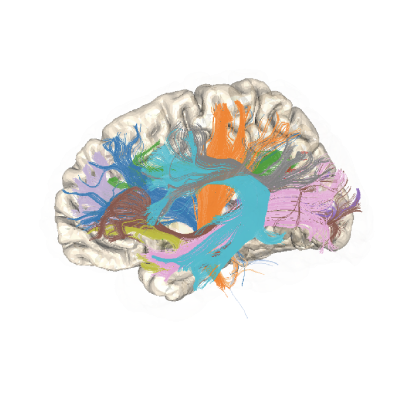
Callosal bundles using AFQ API#
An example using the AFQ API to find callosal bundles using the templates from: http://hdl.handle.net/1773/34926
import os.path as op
import matplotlib.pyplot as plt
import nibabel as nib

import plotly

from AFQ.api.group import GroupAFQ
import AFQ.api.bundle_dict as abd
from AFQ.definitions.image import RoiImage
import AFQ.data.fetch as afd
2026-05-26 22:52:24,359 INFO util.py:154 -- Missing packages: ['ipywidgets']. Run `pip install -U ipywidgets`, then restart the notebook server for rich notebook output.
Get some example data#
Retrieves Stanford HARDI dataset.
afd.organize_stanford_data(clear_previous_afq="track")
---------------------------------------------------------------------------
KeyboardInterrupt                         Traceback (most recent call last)
Cell In[2], line 1
----> 1 afd.organize_stanford_data(clear_previous_afq="track")

File /opt/hostedtoolcache/Python/3.13.13/x64/lib/python3.13/site-packages/AFQ/data/fetch.py:1819, in organize_stanford_data(path, clear_previous_afq)
   1817 # fetches data for first subject and session
   1818 logger.info("fetching Stanford HARDI data")
-> 1819 dpd.fetch_stanford_hardi()
   1821 if path is None:
   1822     if not op.exists(afq_home):

File /opt/hostedtoolcache/Python/3.13.13/x64/lib/python3.13/site-packages/dipy/data/fetcher.py:494, in _make_fetcher.<locals>.fetcher(include_optional)
    491         continue
    492     files[str(n)] = (baseurl + f, md5_list[i] if md5_list is not None else None)
--> 494 fetch_data(files, folder, data_size=data_size, use_headers=use_headers)
    496 if msg is not None:
    497     logger.info(msg)

File /opt/hostedtoolcache/Python/3.13.13/x64/lib/python3.13/site-packages/dipy/testing/decorators.py:201, in warning_for_keywords.<locals>.decorator.<locals>.wrapper(*args, **kwargs)
    194 # Check if the current version is within the warning range
    195 if (
    196     version.parse(from_version)
    197     <= version.parse(current_version)
    198     <= version.parse(until_version)
    199 ):
    200     # Convert positional to keyword arguments and issue a warning
--> 201     return convert_positional_to_keyword(func, args, kwargs)
    203 # If the version is greater than the until_version,
    204 # pass the arguments as they are
    205 elif version.parse(current_version) > version.parse(until_version):

File /opt/hostedtoolcache/Python/3.13.13/x64/lib/python3.13/site-packages/dipy/testing/decorators.py:192, in warning_for_keywords.<locals>.decorator.<locals>.wrapper.<locals>.convert_positional_to_keyword(func, args, kwargs)
    182         warnings.warn(
    183             f"Pass {positionally_passed_kwonly_args} as keyword args. "
    184             f"From version {until_version} passing these as positional "
   (...)    187             stacklevel=3,
    188         )
    190     return func(*positional_args, **corrected_kwargs)
--> 192 return func(*args, **kwargs)

File /opt/hostedtoolcache/Python/3.13.13/x64/lib/python3.13/site-packages/dipy/data/fetcher.py:397, in fetch_data(files, folder, data_size, use_headers, raise_on_error)
    395 logger.info(f"From: {url}")
    396 try:
--> 397     _get_file_data(fullpath, url, use_headers=use_headers, stored_md5=md5)
    398     successful_downloads += 1
    399 except (FetcherError, Exception) as e:

File /opt/hostedtoolcache/Python/3.13.13/x64/lib/python3.13/site-packages/dipy/data/fetcher.py:262, in _get_file_data(fname, url, use_headers, timeout, max_retries, stored_md5)
    260 with open(fname, "wb") as data:
    261     if response_size is None:
--> 262         copyfileobj(opener, data)
    263     else:
    264         copyfileobj_withprogress(opener, data, response_size)

File /opt/hostedtoolcache/Python/3.13.13/x64/lib/python3.13/shutil.py:203, in copyfileobj(fsrc, fdst, length)
    201 fsrc_read = fsrc.read
    202 fdst_write = fdst.write
--> 203 while buf := fsrc_read(length):
    204     fdst_write(buf)

File /opt/hostedtoolcache/Python/3.13.13/x64/lib/python3.13/http/client.py:478, in HTTPResponse.read(self, amt)
    475     return b""
    477 if self.chunked:
--> 478     return self._read_chunked(amt)
    480 if amt is not None and amt >= 0:
    481     if self.length is not None and amt > self.length:
    482         # clip the read to the "end of response"

File /opt/hostedtoolcache/Python/3.13.13/x64/lib/python3.13/http/client.py:608, in HTTPResponse._read_chunked(self, amt)
    605     self.chunk_left = chunk_left - amt
    606     break
--> 608 value.append(self._safe_read(chunk_left))
    609 if amt is not None:
    610     amt -= chunk_left

File /opt/hostedtoolcache/Python/3.13.13/x64/lib/python3.13/http/client.py:648, in HTTPResponse._safe_read(self, amt)
    641 """Read the number of bytes requested.
    642
    643 This function should be used when <amt> bytes "should" be present for
    644 reading. If the bytes are truly not available (due to EOF), then the
    645 IncompleteRead exception can be used to detect the problem.
    646 """
    647 cursize = min(amt, _MIN_READ_BUF_SIZE)
--> 648 data = self.fp.read(cursize)
    649 if len(data) >= amt:
    650     return data

File /opt/hostedtoolcache/Python/3.13.13/x64/lib/python3.13/socket.py:719, in SocketIO.readinto(self, b)
    717     raise OSError("cannot read from timed out object")
    718 try:
--> 719     return self._sock.recv_into(b)
    720 except timeout:
    721     self._timeout_occurred = True

File /opt/hostedtoolcache/Python/3.13.13/x64/lib/python3.13/ssl.py:1304, in SSLSocket.recv_into(self, buffer, nbytes, flags)
   1300     if flags != 0:
   1301         raise ValueError(
   1302           "non-zero flags not allowed in calls to recv_into() on %s" %
   1303           self.__class__)
-> 1304     return self.read(nbytes, buffer)
   1305 else:
   1306     return super().recv_into(buffer, nbytes, flags)

File /opt/hostedtoolcache/Python/3.13.13/x64/lib/python3.13/ssl.py:1138, in SSLSocket.read(self, len, buffer)
   1136 try:
   1137     if buffer is not None:
-> 1138         return self._sslobj.read(len, buffer)
   1139     else:
   1140         return self._sslobj.read(len)

KeyboardInterrupt:
Set tractography parameters (optional)#
We make this tracking_params which we will pass to the GroupAFQ object which specifies that we want 100,000 seeds randomly distributed in the ROIs of every bundle.
We only do this to make this example faster and consume less space.
tracking_params = dict(seed_mask=RoiImage(),
                       n_seeds=25000,
                       random_seeds=True,
                       rng_seed=42)
Set segmentation parameters (optional)#
We make this segmentation_params which we will pass to the GroupAFQ object which specifies that we want to clip the extracted tract profiles to only be between the two ROIs.
We do this because tract profiles become less reliable as the bundles approach the gray matter-white matter boundary. On some of the non-callosal bundles, ROIs are not in a good position to clip edges. In these cases, one can remove the first and last nodes in a tract profile.
segmentation_params = {"clip_edges": True}
Initialize a GroupAFQ object:#
We specify bundle_info as the callosal bundles only
(abd.callosal_bd). If we want to segment both the callosum
and the other bundles, we would pass
abd.callosal_bd() + abd.default_bd()
instead. This would tell the GroupAFQ object to use bundles from both
the standard and callosal templates.
myafq = GroupAFQ(
    bids_path=op.join(afd.afq_home, 'stanford_hardi'),
    dwi_preproc_pipeline='vistasoft',
    t1_preproc_pipeline='freesurfer',
    bundle_info=abd.callosal_bd(),
    tracking_params=tracking_params,
    segmentation_params=segmentation_params,
    viz_backend_spec='plotly_no_gif')

# Calling export all produces all of the outputs of processing, including
# tractography, scalar maps, tract profiles and visualizations:
myafq.export_all()
Create Group Density Maps:#
pyAFQ can make density maps of streamline counts per subject/session
by calling myafq.export("density_map"). When using GroupAFQ, you can also
combine these into one file by calling myafq.export_group_density().
group_density = myafq.export_group_density()
group_density = nib.load(group_density).get_fdata()
fig, ax = plt.subplots(1)
ax.matshow(
    group_density[:, :, group_density.shape[-1] // 2, 0],
    cmap='viridis')
ax.axis("off")
Visualizing bundles and tract profiles:#
This would run the script and visualize the bundles using the plotly interactive visualization, which should automatically open in a new browser window.
bundle_html = myafq.export("all_bundles_figure")
plotly.io.show(bundle_html["01"][0])