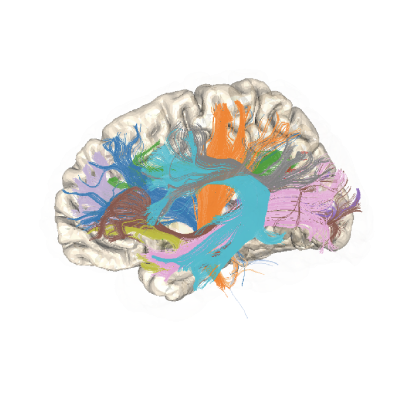
import logging
from math import radians

import numpy as np
from dipy.tracking.streamline import set_number_of_points

import AFQ.viz.utils as vut
from AFQ._fixes import make_mp4

try:
    from fury import actor, window
    from fury.colormap import line_colors
except (ImportError, ModuleNotFoundError) as e:
    raise ImportError(vut.viz_import_msg_error("fury")) from e


[docs]
viz_logger = logging.getLogger("AFQ")


[docs]
def _inline_interact(scene, inline, interact):
    """
    Helper function to reuse across viz functions
    """
    if interact:
        viz_logger.info("Showing interactive scene...")
        show_m = window.ShowManager(
            scene=scene, size=(1200, 1200), window_type="default"
        )
        show_m.start()

    if inline:
        viz_logger.info("Showing inline scene...")
        show_m = window.ShowManager(
            scene=scene,
            size=(1200, 1200),
            window_type="jupyter",
        )
        show_m.start()

    return scene


[docs]
def visualize_bundles(
    seg_sft,
    img=None,
    n_points=None,
    bundle=None,
    colors=None,
    color_by_direction=False,
    n_sls_viz=65536,
    opacity=1.0,
    line_width=2.0,
    flip_axes=None,
    figure=None,
    background=(1, 1, 1),
    interact=False,
    inline=False,
    **kwargs,
):
    """
    Visualize bundles in 3D using VTK.
    Parameters not described below are extras to conform fury and plotly APIs.

    Parameters
    ----------
    seg_sft : SegmentedSFT, str
        A SegmentedSFT containing streamline information
        or a path to a segmented trk file.

    img : Nifti1Image, optional
        Image to register streamlines to.
        Default: None

    n_points : int or None
        n_points to resample streamlines to before plotting. If None, no
        resampling is done.

    bundle : str or int, optional
        The name of a bundle to select from among the keys in `bundle_dict`
        or an integer for selection from the sft metadata.

    colors : dict or list
        If this is a dict, keys are bundle names and values are RGB tuples.
        If this is a list, each item is an RGB tuple. Defaults to a list
        with Tableau 20 RGB values if bundle_dict is None, or dict from
        bundles to Tableau 20 RGB values if bundle_dict is not None.

    color_by_direction : bool
        Whether to color by direction instead of by bundle. Default: False

    n_sls_viz : int
        Maximum number of streamlines to visualize. If there are more than
        this number of streamlines, a random subset of streamlines will be
        visualized. Default: 65536

    opacity : float
        Float between 0 and 1 defining the opacity of the bundle.
        Default: 1.0

    background : tuple, optional
        RGB values for the background. Default: (1, 1, 1), which is white
        background.

    figure : fury Scene object, optional
        If provided, the visualization will be added to this Scene. Default:
        Initialize a new Scene.

    interact : bool
        Whether to provide an interactive VTK window for interaction.
        Default: False

    inline : bool
        Whether to embed the visualization inline in a notebook. Only works
        in the notebook context. Default: False.

    Returns
    -------
    Fury Scene object
    """

    if flip_axes is None:
        flip_axes = [False, False, False]
    if figure is None:
        figure = window.Scene()

    figure.background = (background[0], background[1], background[2])

    for sls, color, name, dimensions in vut.tract_generator(
        seg_sft,
        bundle,
        colors,
        n_points,
        img,
        n_sls_viz=n_sls_viz,
    ):
        sls = list(sls)
        if name == "all_bundles":
            color = line_colors(sls)
        for sl in sls:
            if flip_axes[0]:
                sl[:, 0] = dimensions[0] - sl[:, 0]
            if flip_axes[1]:
                sl[:, 1] = dimensions[1] - sl[:, 1]
            if flip_axes[2]:
                sl[:, 2] = dimensions[2] - sl[:, 2]

        if color_by_direction:
            sl_actor = actor.streamlines(sls, opacity=opacity, thickness=line_width)
        else:
            sl_actor = actor.streamlines(
                sls, colors=color, opacity=opacity, thickness=line_width
            )
        figure.add(sl_actor)

    return _inline_interact(figure, inline, interact)


[docs]
def scene_rotate_forward(show_m, scene):
    window.update_camera(show_m.screens[0].camera, None, scene)
    show_m.screens[0].controller.rotate((0, radians(-90)), None)
    show_m.render()
    show_m.window.draw()


[docs]
def create_mp4(
    figure,
    file_name,
    fps=30,
    az_ang=-0.5,
    size=(600, 600),
):
    """
    Convert a Fury Scene object into a mp4

    Make a video from a Fury Show Manager.

    Parameters
    ----------
    figure : Fury Scene object
        The Fury Scene object to render.

    file_name : str
        The name of the output file.

    fps : int
        The frames per second for the output video.
        Default: 30

    az_ang : float
        The angle to rotate the camera around the
        z-axis for each frame, in degrees.
        Default: -0.5

    size : tuple
        The size of the output mp4, in pixels.
        Default: (600, 600)
    """
    show_m = window.ShowManager(
        scene=figure,
        window_type="offscreen",
        size=size,
    )
    scene_rotate_forward(show_m, figure)
    make_mp4(show_m, file_name, fps=fps, az_ang=az_ang)


[docs]
def visualize_roi(
    roi,
    resample_to=None,
    name="ROI",
    figure=None,
    color=None,
    flip_axes=None,
    opacity=1.0,
    inline=False,
    interact=False,
):
    """
    Render a region of interest into a VTK viz as a volume

    Parameters
    ----------
    roi : str or Nifti1Image
        The ROI information

    resample_to : Nifti1Image, optional
        If not None, the ROI will be resampled to the space of this image.
        Default: None

    name: str, optional
        Name of ROI for the legend.
        Default: 'ROI'

    color : ndarray, optional
        RGB color for ROI.
        Default: np.array([1, 0, 0])

    flip_axes : None
        This parameter is to conform fury and plotly APIs.

    opacity : float, optional
        Opacity of ROI.
        Default: 1.0

    figure : fury Scene object, optional
        If provided, the visualization will be added to this Scene. Default:
        Initialize a new Scene.

    interact : bool
        Whether to provide an interactive VTK window for interaction.
        Default: False

    inline : bool
        Whether to embed the visualization inline in a notebook. Only works
        in the notebook context. Default: False.

    Returns
    -------
    Fury Scene object
    """
    if color is None:
        color = np.array([1, 0, 0])
    roi = vut.prepare_roi(roi, resample_to)
    for i, flip in enumerate(flip_axes):
        if flip:
            roi = np.flip(roi, axis=i)
    if figure is None:
        figure = window.Scene()

    roi_actor = actor.contour_from_roi(roi, color=color, opacity=opacity)
    figure.add(roi_actor)

    return _inline_interact(figure, inline, interact)


[docs]
def visualize_volume(
    volume,
    x=None,
    y=None,
    z=None,
    figure=None,
    flip_axes=None,
    opacity=0.6,
    inline=True,
    interact=False,
):
    """
    Visualize a volume

    Parameters
    ----------
    volume : ndarray or str
        3d volume to visualize.

    figure : fury Scene object, optional
        If provided, the visualization will be added to this Scene. Default:
        Initialize a new Scene.

    flip_axes : None
        This parameter is to conform fury and plotly APIs.

    opacity : float, optional
        Initial opacity of slices.
        Default: 0.6

    interact : bool
        Whether to provide an interactive VTK window for interaction.
        Default: False

    inline : bool
        Whether to embed the visualization inline in a notebook. Only works
        in the notebook context. Default: False.

    Returns
    -------
    Fury Scene object
    """
    volume = vut.load_volume(volume)

    if figure is None:
        figure = window.Scene()

    shape = volume.shape
    if x is None:
        x = shape[0] // 2
    if y is None:
        y = shape[1] // 2
    if z is None:
        z = shape[2] // 2
    slicer_actor = actor.data_slicer(volume, opacity=opacity, initial_slices=(x, y, z))
    figure.add(slicer_actor)

    return _inline_interact(figure, inline, interact)


[docs]
def _draw_core(
    sls,
    n_points,
    figure,
    bundle_name,
    indiv_profile,
    labelled_points,
    dimensions,
    flip_axes,
):
    fgarray = np.asarray(set_number_of_points(sls, n_points))
    fgarray = np.median(fgarray, axis=0)

    colormap = np.asarray(
        [
            [0.265625, 0.00390625, 0.328125],
            [0.28125, 0.15625, 0.46875],
            [0.2421875, 0.28515625, 0.53515625],
            [0.19140625, 0.40625, 0.5546875],
            [0.1484375, 0.5078125, 0.5546875],
            [0.12109375, 0.6171875, 0.53515625],
            [0.20703125, 0.71484375, 0.47265625],
            [0.4296875, 0.8046875, 0.34375],
            [0.70703125, 0.8671875, 0.16796875],
            [0.98828125, 0.90234375, 0.14453125],
        ]
    )
    xp = np.linspace(np.min(indiv_profile), np.max(indiv_profile), num=len(colormap))
    line_color = np.ones((n_points, 3))
    for i in range(3):
        line_color[:, i] = np.interp(indiv_profile, xp, colormap[:, i])
    line_color_untouched = line_color.copy()
    for i in range(n_points):
        if i < n_points - 1:
            direc = fgarray[i + 1] - fgarray[i]
            direc = direc / np.linalg.norm(direc)
            light_direc = -fgarray[i] / np.linalg.norm(fgarray[i])
            direc_adjust = np.dot(direc, light_direc)
            direc_adjust = (direc_adjust + 3) / 4
        line_color[i, 0:3] = line_color[i, 0:3] * direc_adjust
    text = [None] * n_points
    for label in labelled_points:
        if label == -1:
            text[label] = str(n_points)
        else:
            text[label] = str(label)

    if flip_axes[0]:
        fgarray[:, 0] = dimensions[0] - fgarray[:, 0]
    if flip_axes[1]:
        fgarray[:, 1] = dimensions[1] - fgarray[:, 1]
    if flip_axes[2]:
        fgarray[:, 2] = dimensions[2] - fgarray[:, 2]

    sl_actor = actor.streamlines([fgarray], colors=line_color, thickness=20)
    figure.add(sl_actor)

    return line_color_untouched


[docs]
def single_bundle_viz(
    indiv_profile,
    seg_sft,
    bundle,
    scalar_name,
    img=None,
    flip_axes=None,
    labelled_nodes=None,
    figure=None,
    include_profile=False,
):
    """
    Visualize a single bundle in 3D with core bundle and associated profile

    Parameters
    ----------
    indiv_profile : ndarray
        A numpy array containing a tract profile for this bundle for a scalar.

    seg_sft : SegmentedSFT, str
        A SegmentedSFT containing streamline information
        or a path to a segmented trk file.

    bundle : str or int
        The name of the bundle to be used as the label for the plot,
        and for selection from the sft metadata.

    scalar_name : str
        The name of the scalar being used.

    img : Nifti1Image, optional
        Image to register streamlines to.
        Default: None

    flip_axes : ndarray
        Which axes to flip, to orient the image as RAS, which is how we
        visualize.
        For example, if the input image is LAS, use [True, False, False].
        Default: [False, False, False]

    labelled_nodes : list or ndarray
        Which nodes to label. -1 indicates the last node.
        Default: [0, -1]

    figure : Plotly Figure object, optional
        If provided, the visualization will be added to this Figure. Default:
        Initialize a new Figure.

    include_profile : bool, optional
        Not yet implemented in fury. Default: False

    Returns
    -------
    Fury Figure object
    """
    if labelled_nodes is None:
        labelled_nodes = [0, -1]
    if flip_axes is None:
        flip_axes = [False, False, False]
    if figure is None:
        figure = window.Scene()
    figure.background = (1, 1, 1)

    n_points = len(indiv_profile)
    sls, _, bundle_name, dimensions = next(
        vut.tract_generator(seg_sft, bundle, None, n_points, img)
    )

    _draw_core(
        sls,
        n_points,
        figure,
        bundle_name,
        indiv_profile,
        labelled_nodes,
        dimensions,
        flip_axes,
    )

    return figure